Free Amazon AI Audit — Will Amazon recommend your product?·No login · Score in 30 sec · Nobody else offers this.Try Free
Category

Research & Analysis

Find opportunities
KeySpy — ASIN Keyword Intelligence

What keywords is yourcompetitor hiding from you?

Enter any Amazon ASIN and see the keywords it ranks for — organic and sponsored — with measured search volume, the organic position (sponsored slots excluded) and the provider's crawl date, plus how many results Amazon returns for that search. Then send them all to ScribeAI in one click.

Cancel anytime · $10/mo Lite plan · Starter, Pro & Business plans
14
Marketplaces
6h
Result cache
1-click
Export to ScribeAI
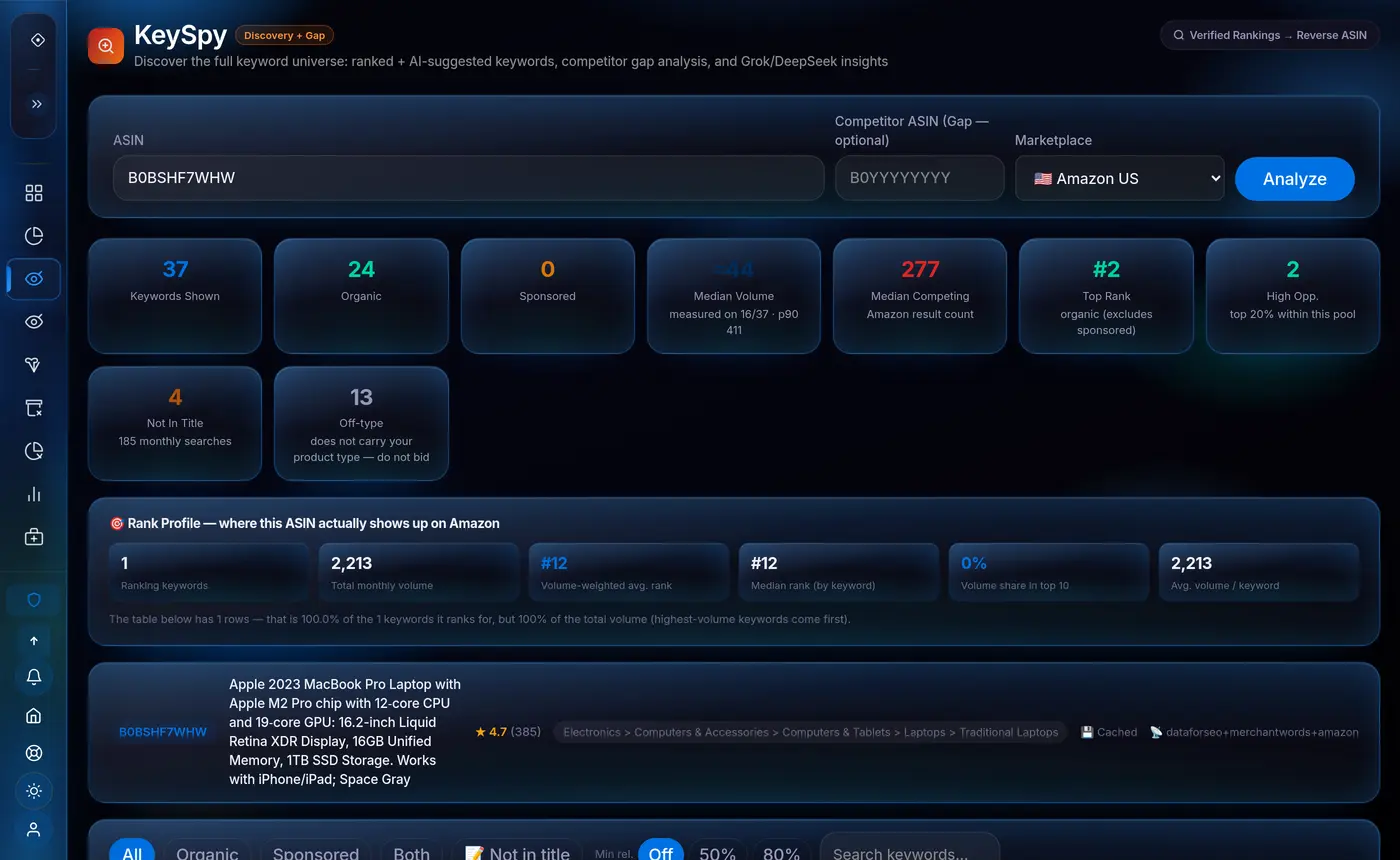
KeySpy paneli — bir rakip ASIN icin olculmus anahtar kelimeler, organik/sponsorlu ayrimi, medyan hacim, rakip sayisi ve siralama profili
100
Keywords per analysis (cap)
organic + sponsored
14
Amazon marketplaces
11 of them with keyword data (TR/JP/AE: product identity only)
6h
Result cache
each row carries the provider's crawl date
1-click
ScribeAI export
no other tool has this
The real problem

Your competitors have a
keyword strategy. You don't know it.

Top Amazon sellers don't guess which keywords to target — they study what's already working. Without KeySpy, you're writing listings blindly while your competitors rank for hundreds of keywords you've never considered.

Targeting keywords that don't convert
Without knowing what actually drives sales for similar products, you waste time optimizing for low-converting keywords while missing the ones that matter.
Missing hundreds of long-tail keywords
Your top competitor ranks for 200+ keywords. You know maybe 20. The rest are driving traffic and sales every single day — and you're invisible for all of them.
No way to spot emerging trends early
A keyword trending upward today could be a major search term in 3 months. Without trend data, you can't move early — but your competitors can.
Without KeySpy
20 keywords — guessed
You write your listing with keywords you think matter. Your competitor ranks for 200+. You're missing 90% of the opportunity — and you don't even know it.
With KeySpy
54 keywords — discovered
You see the keywords your top competitor ranks for — with volume, organic rank, competing products and relevance. Send them all to ScribeAI in one click and start writing.
KeySpy → ScribeAI
Send discovered keywords straight into your listing with one click
How it works

From ASIN to full
keyword map in seconds.

One competitor ASIN is all it takes. KeySpy does the rest — and hands you every keyword on a silver platter.

Paste a competitor ASIN
Find any competitor on Amazon, copy their ASIN from the product URL, paste it into KeySpy and select your marketplace — 14 Amazon marketplaces are in the dropdown, and the three without keyword-data coverage (TR, JP, AE) are flagged right there. Takes 10 seconds.
KeySpy reveals everything
In 15-30 seconds you see the keywords that product ranks for — organic positions, sponsored placements, measured monthly search volume and the number of results Amazon returns for each search. Filter, sort, and spot the winners instantly.
Use them — one click
Download as CSV for your PPC campaigns — or hit "Send to ScribeAI" and start writing your optimized listing immediately. All keywords load instantly. Zero copy-pasting. 2.5 hours saved per listing.
What the data means

Every number tells you
something actionable.

Raw keyword data is useless without context. KeySpy shows you the metrics that actually matter — and what each one means for your strategy.

Quick decision guide
High volume + Easy
Target immediately — high reward, low competition. Move fast.
High volume + Hard
Long-term goal — worth building toward as you grow reviews.
Trend ↑ + Any competition
Move fast — get in before competition catches up with the trend.
Sponsored only
Organic gap — competitor is paying for it but not ranking. Your opportunity.
Search volume
How many times per month shoppers search for this keyword on Amazon. Higher volume = more potential traffic. Use this to prioritize which keywords are worth the effort.
89,400/mo → High priority
Rank position
Where your competitor appears in search results for this keyword. #1 = first result, maximum visibility. #15+ = ranks but not prominently. Target keywords where they're in top 10.
#3 organic → Very strong
Competing products
Measured, not estimated
How many results Amazon actually returns for that search — the real measure of supply. Demand divided by supply gives the opportunity label, which is a RANK within the returned pool, not an absolute score. When the provider does not report a result count, the cell stays a dash instead of a fabricated 0.
1,240 results → thin supply
Trend (monthly series)
Shown only when measured
Direction of the keyword's MONTHLY search series: the newer half of the months compared with the older half. It needs at least 4 months of provider data — when the series is missing, the whole column is hidden rather than showing a made-up "stable".
↑ Rising over the last months
Organic vs sponsored
Organic = naturally indexed, algorithm ranked it. Sponsored = paying for ads. Sponsored-only keywords are often organic gaps — your competitor is buying traffic for a keyword they don't rank for.
Sponsored only → Free opportunity
Full feature set

Everything you need to
rank higher than your competition.

Not just a keyword list — a complete competitive intelligence system. Every feature is built to give you a clear advantage.

Full ASIN reverse lookup
Enter any ASIN and see the keywords it ranks for — organic and sponsored — with measured search volume, the organic position and how many results Amazon returns for that search. Up to 100 keywords per analysis, and the provider's total is shown beside it. Every row carries its source: unverified rows are badged as AI estimates and excluded from the summary tiles.
Core feature
One-click export to ScribeAI
Found your keywords? Hit one button and they all appear in ScribeAI instantly. No CSV, no copy-paste, no manual entry. 2.5 hours saved per listing. Exists nowhere else.
Exclusive
Listing gap: measured keywords missing from your title
KeySpy compares every keyword against your own title and bullets. Keywords with MEASURED volume whose words are missing from your listing get a "Not in title" badge, a dedicated filter and a tile showing their combined monthly search volume — the most direct action this tool produces. A monthly trend arrow is shown too, but only when the provider actually returns the monthly series.
Actionable
Organic vs sponsored filter
Separate what your competitor ranks for naturally vs. what they're paying to appear for. Sponsored-only keywords may be organic gaps you can exploit for free with a great listing.
CSV export for PPC
Download the full keyword list with all data points — ready for PPC campaign building, negative keyword lists, team sharing, or your own analysis tools.
14 Amazon marketplaces — 11 with keyword data
US, UK, DE, FR, IT, ES, CA, AU, IN, MX and SA return measured keyword data. Amazon TR, JP and AE are in the list too, but the keyword provider cannot measure volume there (TR/JP have no location code, AE has no volume data): there you get product identity and real Amazon search suggestions, and the rank/volume columns honestly stay empty instead of being filled with estimates.
The unfair advantage

KeySpy → ScribeAI.
No other tool does this.

Every competitor platform makes you export keywords, paste them into a spreadsheet, and manually track them in a separate listing editor. We made the entire workflow instant.

1
Analyze your top competitor's ASIN
Paste their ASIN into KeySpy. In 15-30 seconds you get up to 100 keywords — volume, organic rank, competing products and relevance for each one, with the provider's total shown beside the count.
2
Filter and select the best ones
Sort by volume. Filter Top 10 only. Remove hard keywords you can't rank for yet. Pick the 15–20 keywords that make most sense for your product.
3
Hit "Send to ScribeAI" — one click
Your selected keywords transfer instantly. They're loaded and tracked in ScribeAI. Just write — watch keywords light up green, score climbs to 100%.
One-click ScribeAI integration
Starter (50/day) · Pro (200/day) · Business (unlimited)
Exclusive to Seller Niche
Keyword export workflow — tool by tool
Seller Niche (KeySpy → ScribeAI)1 click
Export CSV → re-import into listing editorManual
2.5 hrs
Average time saved per listing
vs manual keyword workflow

"Your competitors didn't find those keywords by accident. They reverse-engineered competitor keywords that were already working. KeySpy makes that 10 seconds of work."

— KeySpy, built by Seller Niche for serious Amazon sellers

Start spying on your
competitors today.

Cancel anytime. $10/mo Lite.
Cancel anytime — no questions asked.

See ScribeAI →
FAQ

Frequently asked questions.

What is reverse ASIN lookup and why does it matter?+
Reverse ASIN lookup means entering a competitor's product ID and seeing every keyword that product ranks for in Amazon search results. It matters because it shows you exactly which keywords are driving traffic and sales for similar products — so you can target the same ones instead of guessing. It's the fastest way to build a high-quality keyword list for your listing or PPC campaigns.
Where does KeySpy get its keyword data?+
Ranked keywords and search volume come from third-party Amazon keyword-index providers (DataForSEO, plus MerchantWords for the full rank profile). Product identity — title, brand, rating, price — comes from a live product lookup. Amazon's own autocomplete supplies real shopper queries with no volume attached; those rows are badged AMZ. Each row shows the provider's SERP crawl date on hover, and a completed analysis is cached for 6 hours. When no verified source can price a keyword, the cell stays a dash and, if the AI layer suggested the keyword at all, the row is badged AI and kept out of the summary tiles.
How many ASINs can I analyze per month?+
The limit is per rolling 24-hour window, not per calendar month. Trial ($10/mo): 3 analyses. Multi-Channel ($49/mo): 25. Starter ($69/mo): 50. Pro ($99/mo): 200. Business ($229/mo): unlimited. Re-opening an analysis you already ran is free — a completed result is cached for 6 hours and served without touching your quota.
What's the difference between organic and sponsored keywords?+
Organic keywords are ones where the product appears naturally in search results — Amazon's algorithm has indexed and ranked the listing. Sponsored keywords are ones where the seller is running a paid ad. Both are valuable: organic keywords tell you what to optimize for, while sponsored-only keywords may reveal gaps where your competitor is paying but not organically indexed — which you can exploit with a great listing.
How does the ScribeAI export work?+
After analyzing an ASIN in KeySpy, filter and select the keywords you want, then click the green "Send to ScribeAI" button. Your keyword list transfers instantly — all keywords are loaded and ready to track as you write your listing. No CSV, no copy-paste. The whole transfer takes about 2 seconds.
Which Amazon marketplaces are supported?+
The KeySpy dropdown carries 14 Amazon marketplaces: US, UK, DE, FR, IT, ES, JP, CA, AU, TR, IN, MX, AE and SA. Eleven of them return measured keyword data. Amazon TR, JP and AE are the exceptions — the keyword provider has no location code for amazon.com.tr or amazon.co.jp, and its amazon.ae location has no volume data, so rank, volume, competing products, trend and CPC cannot be measured there. Those three are flagged in the dropdown before you run anything, and the result page repeats the warning: empty cells mean "not measured", never "zero".